How It Works
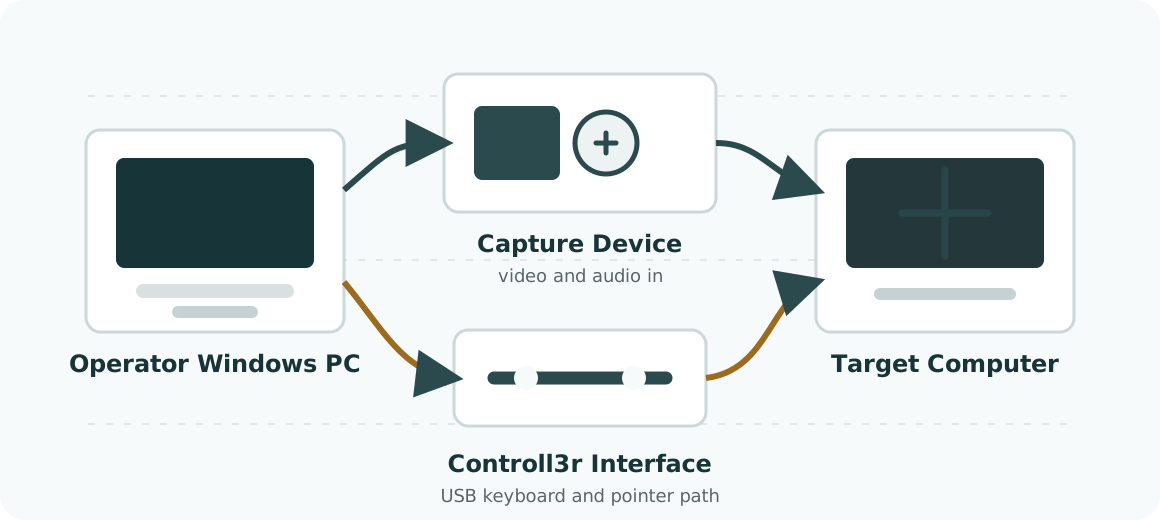
Controll3r has two paths: video comes back through a capture device, and input goes out through the Controll3r Interface. The target sees ordinary USB keyboard and pointer hardware.
Operator Side
The operator computer runs the Controll3r Windows application. It owns the live console, capture settings, audio monitoring, screenshots, recordings, macros, snippets, saved sessions, and optional REST API.
The installer is self-contained. A separate .NET installation is not required.
Video Path
The target's HDMI, SDI, or other supported video output connects to a compatible capture device. Controll3r supports common standards-compliant USB/UVC capture devices and a native Blackmagic DeckLink path when Blackmagic Desktop Video is installed.
The operator computer receives the video and supported audio. Controll3r can display the feed, take PNG snapshots, record MP4 files, run OCR against selected regions, and measure the delay from target input to captured frame.
Input Path
The Controll3r Interface connects to the operator computer on one side and the target on the other. Because the target sees standard USB input devices, control works before the operating system is running and without a target-side driver.
Live operation uses relative mouse movement for natural control. Automation uses an absolute pointer device for exact clicks and repeatable macro playback.
Visual Anchor Automation
Recorded macros can use fixed positions or Visual Anchors. A Visual Anchor is a small image captured from the target screen. During playback, Controll3r searches the current target image for the anchor and acts at the matched location.
This lets a macro wait for screens, choose paths, repeat work, and stop when the expected visual condition is not met.
Local Operation
Core workflows run on the operator computer. The target does not need a Controll3r account, network connection, or target-side service. The optional API runs on the operator computer for local or LAN automation.